Night Owl Protect
- 4.6
- Rating
- 1.00M
- Installs
- Free
- Price
 Analysis by App-foxy
Night Owl Protect is a free home-security app from Night Owl SP, LLC, and I found its most useful role in one simple idea: bringing the cameras and security equipment in your home into a single place that you can check from your phone. That sounds straightforward, but it changes how practical a security system feels day to day. Instead of treating a camera as something I only open after a notification, I can use the app as a regular connection point with the devices watching over my home.
My review focuses on that central capability rather than pretending the app is a complete replacement for every kind of security service. It is a companion for Night Owl equipment, so its value depends heavily on whether you already use compatible products from the same ecosystem. For the right household, that focus is helpful. For someone starting from scratch and comparing every camera brand, it is also the first limitation to understand.
One place to stay connected to a Night Owl security system
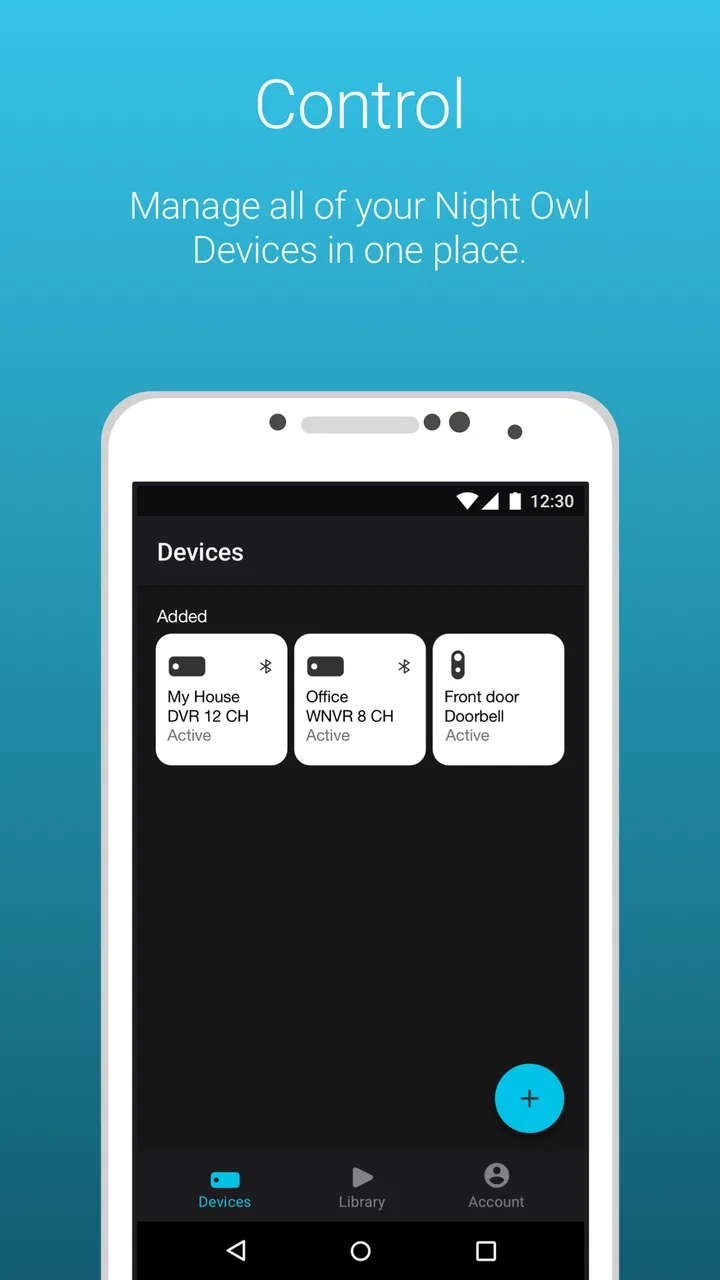
The strongest reason to use Night Owl Protect is convenience. A home-security setup can become frustrating when cameras, recording hardware, and mobile access feel like separate products. The app gives those pieces a shared mobile interface, making it easier to check what is happening without going to a dedicated monitor or opening a web browser.
You May Also Like

 Blood Strike: 2.5 Anniversary
Blood Strike’s Loadouts Turn Every Drop Into a Tactical Gamble
A close look at Blood Strike’s custom loadouts: how fast access to signature weapons reshapes its battle royale rhythm, rewards preparation, and narrows the gap between fights.

 Pandora - Music & Podcasts
Pandora’s Music Is Easy to Start, but Harder to Recover
Pandora’s strength is its low-effort path from a seed to a station. Its weak spot is how much confidence it asks you to place in connection, setup, and quiet recovery.

 8 Ball Pool
 Is Built on Rivalries, Rematches, and Routine
A close look at the rivalries, rematches, shared routines, and unanswered safety questions that turn a quick pool match into a persistent mobile community.

 Samsung Music
’s Quiet Strength Is Playing What You Already Own
Its reach comes less from spectacle than from dependable access to a personal library. That simplicity is both the app’s strongest retention engine and its ceiling.

 AccuWeather: Weather Radar
AccuWeather Review: A Quick, Clear Forecast for Everyday Decisions
For everyday plans, the best forecast is the one you can understand quickly. AccuWeather makes rain timing, radar, and local conditions easy to act on, with a few trade-offs.

 Hill Climb Racing
Why Hill Climb Racing Still Turns Crashes Into One More Run
A tiny car, a bumpy hill and one more upgrade: Hill Climb Racing keeps resurfacing because its simple chaos makes every near-miss feel personal.
More From Our News Desk
View All News


In everyday use, I see this as a practical control habit rather than a dramatic security feature. I might open the app to check the front of the house before leaving, look at an entry area while away, or confirm that everything appears normal after hearing an unexpected sound. The benefit is not that the phone magically makes a home secure. The benefit is that access becomes more immediate, which makes me more likely to check the system when checking it matters.
The app belongs in the House & Home category, and that description fits better than calling it a general-purpose camera viewer. It is designed around the relationship between a household and its Night Owl security equipment. That narrow purpose helps keep the experience relevant, but it also means I would not choose it simply because I wanted a camera app with broad compatibility across unrelated brands.
Night Owl Protect is free to install, with an Everyone content rating, and it runs on devices using Android 8.0 or later. Those details make it approachable for many households, especially people using an older Android phone who do not want to replace hardware just to access their security system. The current version is 1.6.2, so I would still check that the phone and Night Owl equipment work together before relying on the app for important monitoring.
Why mobile access matters more than it first appears
A security camera is only useful when its information is available at the moment I need it. A recorder sitting in a cabinet may store footage, but it does not help much if I am away and want to see whether a delivery has arrived or whether a familiar area looks normal. The app turns that stored or connected system into something I can consult during ordinary routines.
That convenience also affects how a family shares responsibility. One person may normally manage the equipment, while another may need to check the home during a trip or an unusual situation. A mobile companion can reduce the need for everyone to understand the physical recorder in detail. I still would not assume that every household member should have unrestricted access; setting up sensible account and device habits is part of using any connected security product responsibly.
The important distinction is between remote access as a convenience and professional monitoring as a service. Night Owl Protect can make a compatible system easier to reach, but I would not treat the app as a substitute for emergency services, a monitored alarm provider, or good physical security. It is a tool for seeing and managing a home-security setup, not a guarantee that someone will intervene when I am unavailable.
What using the app feels like in practice
My preferred way to use a security app is in short sessions. I do not want to spend several minutes navigating through menus just to answer a basic question. Night Owl Protect makes the most sense when I open it with a clear purpose: check a camera, review what is happening around the property, or keep an eye on the home while I am away. That focused use is where a dedicated security companion has an advantage over a collection of unrelated devices.
There is a useful difference between a quick glance and a serious review. A quick glance helps me decide whether everything looks ordinary. A more careful review is appropriate when something seems out of place, because a live view alone may not explain what happened earlier. I recommend developing a simple routine: check the camera view first, then review relevant footage or device information if the situation deserves closer attention. This prevents the common mistake of treating the first image on screen as the entire story.
Another practical tip is to name or organize cameras according to the way people actually describe the home. “Front door,” “side gate,” or “garage” is easier to understand under pressure than a technical label. The app’s usefulness depends partly on how clearly the system is arranged before an incident occurs. Spending a little time making the setup understandable can save confusion when I am checking it from outside the house.
I also think about the app in terms of attention. Security notifications and camera access are valuable only when they remain meaningful. If I constantly open the app for harmless movement or routine activity, I may start ignoring it. I would rather use a smaller number of relevant viewing habits and keep the system understandable than turn every possible alert into background noise. That is not a special feature claim; it is a practical way to get more value from a mobile security companion.
A realistic evening-away scenario
Imagine I am visiting friends for the evening and remember that I left a package expected near the entrance. With a compatible Night Owl setup, I can use the phone app to check the relevant area instead of asking someone to drive past the house. If the view looks normal, I can continue my evening with more confidence. If something looks unusual, I have an early reason to contact a neighbor or take another sensible step.
The same workflow can help when a family member is expecting a visitor, when I want to check an exterior area after a storm, or when I am away on a short trip. These are modest situations, but they show the app’s real effect: it lowers the effort required to look in on the home. That lower effort is often more valuable than a long list of advanced controls that I rarely use.
For travel, I would test the complete setup before leaving rather than assuming everything will work perfectly when I am hundreds of miles away. I would confirm that the cameras appear as expected, that I know which view corresponds to each location, and that the people who may need access understand the basic workflow. A security app should be part of the preparation, not something I troubleshoot for the first time during an emergency.
The tradeoffs behind the convenience
The biggest tradeoff is ecosystem commitment. Night Owl Protect is most compelling when my cameras and related equipment already come from Night Owl. If I have a mixed collection of products from several manufacturers, a broader smart-home platform may be more convenient because it can bring different brands together. That alternative may offer a wider central dashboard, even if it is less tailored to Night Owl hardware.
On the other hand, a broad platform can introduce its own complications. Different brands may expose different controls, use different account systems, or behave inconsistently inside one interface. A dedicated companion app avoids some of that ambiguity by concentrating on one manufacturer’s equipment. I would choose the focused approach when reliable familiarity matters more to me than combining every smart device in the house.
There is also a difference between checking a home and understanding an event. A phone screen is excellent for a quick look, but it is not always the best environment for carefully examining a long sequence of activity. Small details can be harder to interpret on a mobile display, especially when I am distracted or using a weak connection. If I expect to investigate an incident in depth, I would prefer a larger screen or the original recording setup when available.
Network dependence is another practical consideration. Remote access is only as dependable as the connection between the phone, the home system, and the equipment itself. If the home network, camera connection, or phone service has a problem, the app cannot remove that underlying obstacle. This is why I would never rely on the app as my only layer of protection. Locks, lighting, careful routines, and a plan for emergencies still matter.
Security and privacy deserve attention too. A camera app connects personal spaces to a phone, so I would use a strong account password, protect the phone itself, and avoid sharing access casually. I would also think carefully about where cameras point and who genuinely needs to view them. The convenience of remote access should not lead me to forget that indoor and outdoor camera footage can reveal a great deal about daily life.
Finally, the app is not equally useful for every type of user. Someone who wants a simple camera that works independently, without learning about a larger security system, may find a standalone camera product easier. Someone who wants a professionally managed alarm response may need a dedicated security service instead. Night Owl Protect makes the most sense when I want mobile access to a Night Owl-centered setup and accept the responsibilities that come with managing it.
Small workflow choices that improve the experience
One of my main recommendations is to create a “normal view” habit. Check the important areas at a quiet time when nothing unusual is happening. That gives me a mental reference for lighting, camera angle, and ordinary activity. Later, when I open the app because something seems wrong, I can compare what I see with a familiar baseline instead of trying to interpret the scene from scratch.
A second useful habit is to separate routine checks from evidence review. I would not scroll through footage every time I open the app. I would use the quick view for normal reassurance and reserve detailed review for a specific question, such as when an object disappeared or a visitor arrived. This keeps the app from becoming a time-consuming chore while preserving a clearer process when something deserves attention.
A third insight is that household roles should be agreed on before they are needed. Decide who normally checks the system, who can help during travel, and what should happen if a view looks suspicious. The app can provide access, but it cannot decide whether a situation is harmless, urgent, or better handled by someone nearby. Clear human decisions make the technology more useful than simply adding more people to an account.
I would also avoid judging the app only by how quickly it opens on the first day. The real test is whether I can find the camera I need when I am tired, distracted, or away from home. If the setup feels confusing, I would simplify the camera names, remove unnecessary habits, and practice the most likely tasks. A security interface succeeds when it supports calm decisions, not when it merely displays many options.
Who should choose Night Owl Protect?
I think the app is a good fit for people who already own compatible Night Owl equipment and want a convenient way to stay connected to it from an Android phone. It is especially useful for homeowners who travel, check on an empty property, share responsibility for a household, or simply prefer not to depend on a dedicated recorder screen. The free price also makes trying the mobile companion less of a financial commitment, provided the existing equipment is suitable.
Its reception suggests that many users find the approach worthwhile: the app has a 4.6 average from around twenty-three thousand ratings, with more than six thousand written reviews and over a million installs. Those figures do not replace my own judgment, but they do indicate that this is an established companion rather than an obscure experiment.
I would be more cautious if I were still choosing my entire security setup. In that situation, I would compare Night Owl’s hardware compatibility and mobile experience with standalone cameras and broader smart-home systems. The best choice depends on whether I value a focused manufacturer ecosystem or the freedom to mix brands. Neither approach is automatically better; the wrong one is the approach that leaves me confused about how to access the home when I need to.
I would also skip it as my primary solution if I expected guaranteed emergency response, advanced professional monitoring, or a single app for every smart device I own. Those needs point toward a different category of product. Night Owl Protect is better understood as a practical mobile bridge to Night Owl security equipment.
After using it with that expectation, my opinion is positive but specific. The app’s real strength is not flashy presentation; it is the reduction of friction between me and the security system already installed at home. When I know which view I need, understand the limits of remote access, and keep a sensible household routine, it becomes a useful everyday tool. For Night Owl owners who want straightforward mobile visibility, I would recommend giving it a try; for everyone else, I would first decide whether the Night Owl ecosystem itself is the right foundation.
Night Owl SP, LLC has kept the product focused on the home-security connection rather than turning it into a general-purpose smart-home dashboard. That focus will feel reassuring to the right user and restrictive to another. With its Everyone rating, support for Android 8.0 and later, and no purchase price for the app itself, it is easy to consider. The more important question is practical: will having the system on my phone make me more likely to check, understand, and respond to what is happening at home? For compatible Night Owl households, my experience says yes.
FAQs for Night Owl Protect
01What is Night Owl Protect?
Night Owl Protect is a security app designed to enhance your surveillance experience. It allows you to monitor live video feeds, playback recordings, and receive real-time alerts from your Night Owl security system. This app is available on both Android and iOS platforms, providing comprehensive security management from the convenience of your smartphone.
02How do I set up Night Owl Protect with my security system?
Setting up Night Owl Protect is straightforward. First, download the app from the Google Play Store or Apple App Store. Next, create an account or log in with your existing credentials. Follow the in-app instructions to connect your security devices. Ensure your system is connected to the internet for seamless integration and full functionality.
03Can I access my security cameras remotely with Night Owl Protect?
Yes, Night Owl Protect allows you to access your security cameras remotely. With an internet connection, you can view live video feeds and recorded footage from anywhere in the world. This feature ensures you stay connected to your home or business security at all times, providing peace of mind while you're away.
04What features does Night Owl Protect offer?
Night Owl Protect offers a range of features including live video streaming, two-way audio, push notifications for real-time alerts, and playback options for recorded footage. The app also supports multiple camera views, enabling you to monitor different areas simultaneously. These features make it a comprehensive tool for managing your security system effectively.
05Is Night Owl Protect secure and reliable?
Night Owl Protect prioritizes user security and privacy. The app uses encryption protocols to protect your data and video feeds from unauthorized access. Regular updates are provided to enhance reliability and introduce new features. Users can trust that their surveillance data is secure with Night Owl Protect, making it a reliable choice for security management.
Pros
- User-friendly interface for easy navigation.
- Real-time alerts keep you informed instantly.
- Customizable settings for personalized use.
- High-quality video resolution enhances security.
- Remote access provides flexibility and control.
Cons
- Initial setup can be time-consuming.
- App may occasionally crash on older devices.
- Limited compatibility with some camera models.
- Requires stable internet for optimal performance.
- Notifications can be overwhelming at times.

Night Owl Protect
Gallery